
Explanation
The LiveDesign Connector for Pipeline Pilot allows to launch Pipeline Pilot protocols to interact with LiveDesign using its API. Thus, both environments need to communicate together.
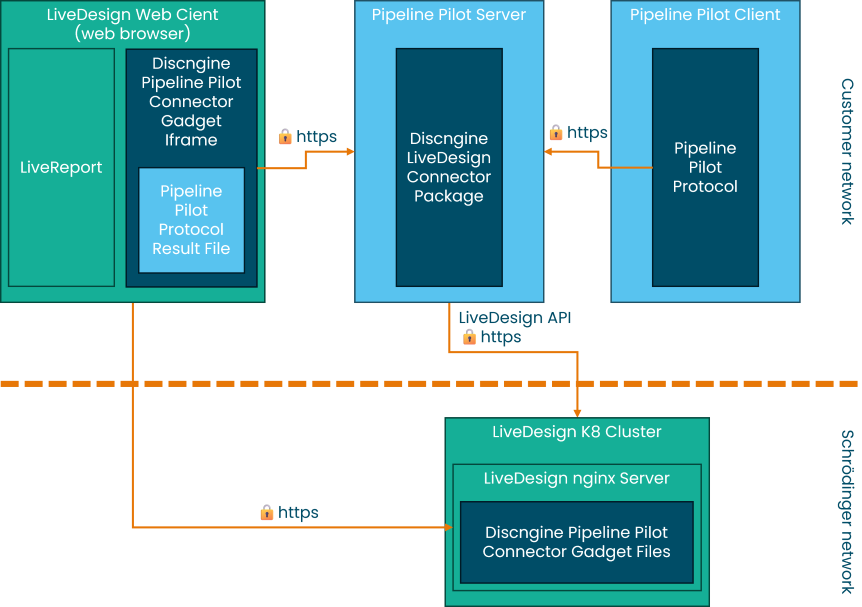
Most of the time, LiveDesign server is hosted by Schrödinger on a cloud instance (bottom part of the schema) and communication is required between customer and Schrödinger network.
The Connector can be used either from the Pipeline Pilot client (right part of the schema) or from the LiveDesign UI (left part of the schema), which is accessed from a web browser, so from the user workstation. In both cases API requests are initiated from Pipeline Pilot server to LiveDesign.
The Connector gadget is a web application which is loaded into LiveDesign UI. It is hosted by LiveDesign because its files are stored on the server (bottom part of the schema). Note that this is true only if the recommended installation mode (livedesign_hosted set to true in helm chart) has been used.
Requirements
For the reasons mentioned in the previous section, when LiveDesign is deployed on Schrödinger's cloud, outbound connections are required from customer network to Schrödinger network for Pipeline Pilot servers and users workstations. Note that if a proxy or WAF is used to access the Schrödinger network, the URL of LiveDesign server must be whitelisted on it.