---
title: "How to set up a Reverse Proxy for Pipeline Pilot and Spotfire"
slug: "connector-spo-pp-admin-tutorials-reverse-proxy"
updated: 2026-10-14T14:03:02Z
published: 2026-10-14T14:03:02Z
canonical: "docs.discngine.com/connector-spo-pp-admin-tutorials-reverse-proxy"
stale: true
---
> ## Documentation Index
> Fetch the complete documentation index at: https://docs.discngine.com/llms.txt
> Use this file to discover all available pages before exploring further.
# How to set up a Reverse Proxy for Pipeline Pilot and Spotfire
## Objective
Assuming you have one Spotfire server and one Pipeline Pilot server, each on a different machine, we will go through the steps required to set up a reverse proxy with SSL, which will allow you to access both Spotfire Web and Pipeline Pilot with the same address. The reverse proxy will take care of rewriting urls and set-cookie instructions, and of ssl-offload if required (i.e. downgrading to HTTP).
## Overview
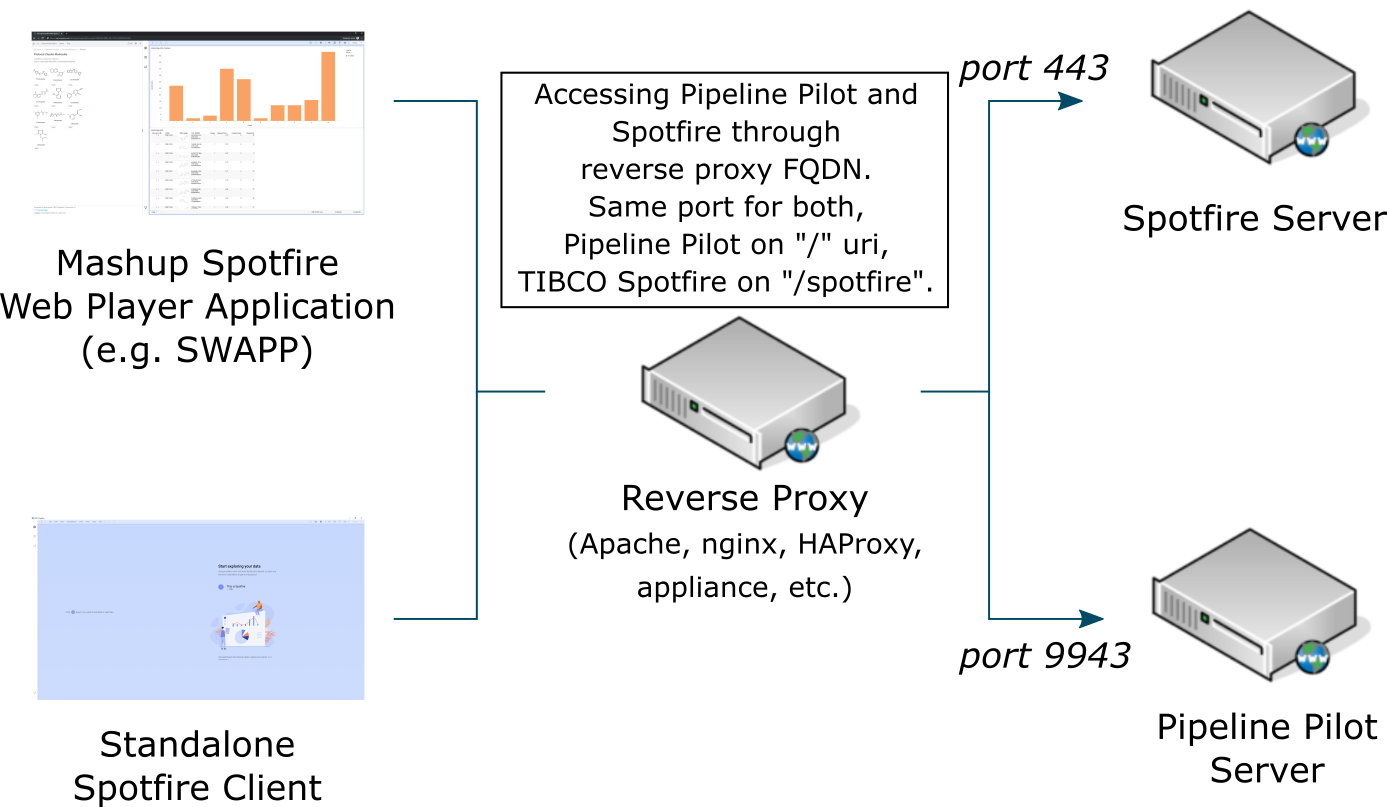
## Configuration: Pipeline Pilot
### Reverse Proxy and Load Balancing
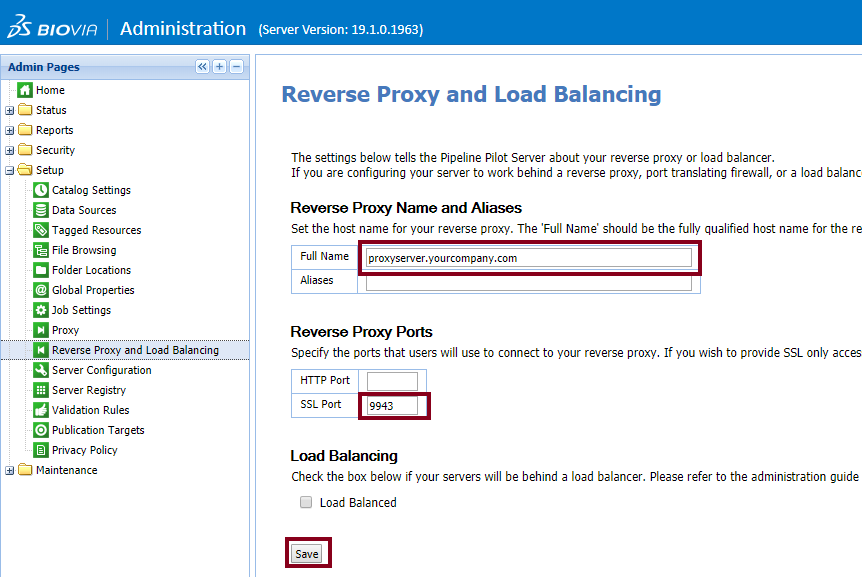
Navigate to `https://[ppserver.yourcompany.com]:9943/admin/` and login with admin privileges. Then go to **Setup** > **Reverse Proxy and Load Balancing**.
Under **Reverse Proxy Name and Aliases**, enter the FQDN of your reverse proxy server in **Full Name**.
Under **Reverse Proxy Ports**, enter the port that will be used by the reverse proxy to connect to the Pipeline Pilot Server (typically, 9943).
Finally, click **Save**.
### Global Properties
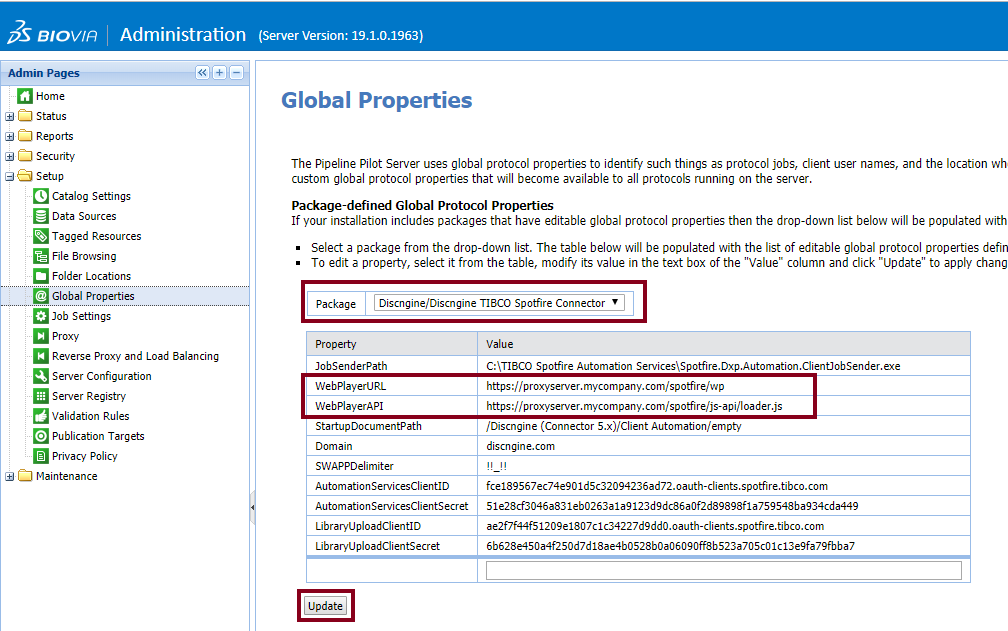
Go to **Setup** > **Global Properties** then select *Discngine/Discngine TIBCO Spotfire Connector*.
Here, set the **WebPlayerURL** and **WebPlayerAPI** to point to the relevant path **on your reverse proxy server**.
The path to the **WebPlayerAPI** depends on the version of Spotfire. See [Installation](/public/docs/connector-spo-pp-admin-guides-installation#set-global-properties) for more details.
Make sure to hit the **Update** button for each property.
### Restart server
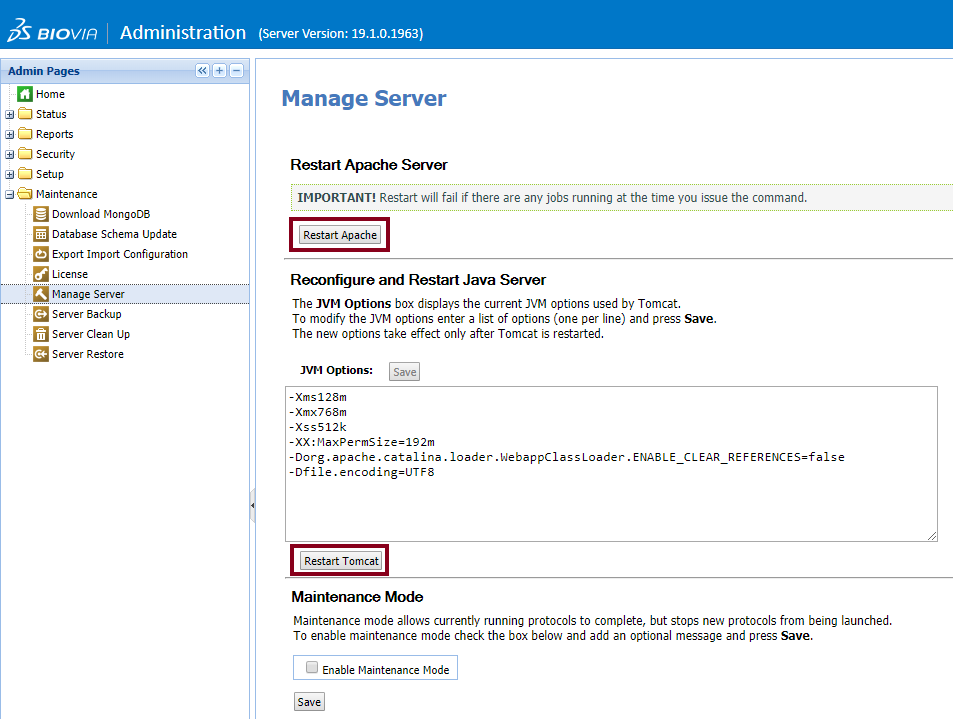
Finally, go to **Maintenance** > **Manage Server** and restart both **Apache and Tomcat** servers.
## Configuration: Spotfire®
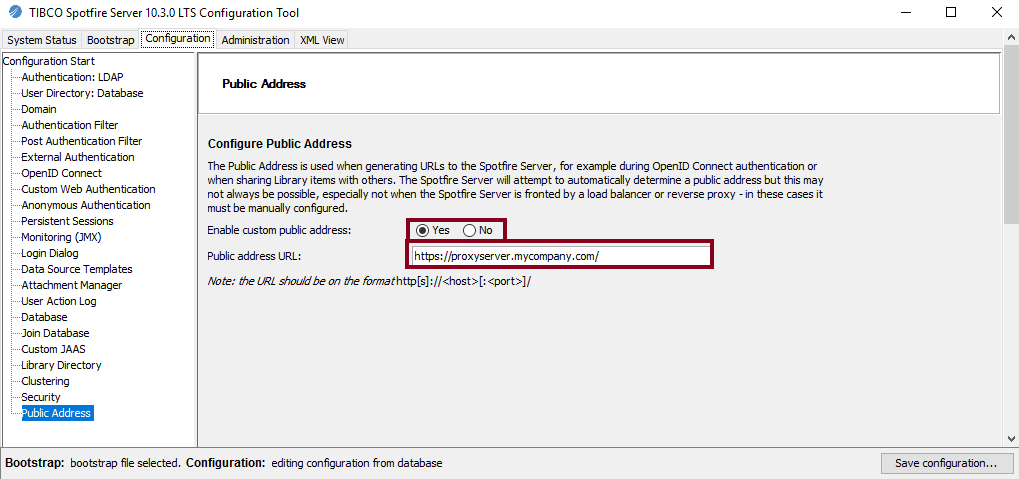
1. Start Spotfire Server Configuration Tool, either directly on the Server or remotely. (e.g. if you RDP on the Server, from Windows Menu > Spotfire Server X.X.X > Configure Spotfire Server X.X.X)
2. Go to the **Configuration** tab, then **Public Address**
3. Set *Enable custom public address* to *Yes*
4. Under *Public Address URL* enter the URL of your reverse proxy
5. Save the new configuration
## Configuration: Reverse Proxy Server
As an example, we will set up an Apache server on Linux Ubuntu.
1. Install Apache
```
sudo apt install apache2
```
1. Enable modules proxy, proxy-http and ssl
```
sudo a2enmod proxy proxy_http ssl
```
1. Edit the file ports.conf to add the listening port of the virtual host of Pipeline Pilot
```
sudo vi /etc/apache2/ports.conf
```
and add the following:
```
# If you just change the port or add more ports here, you will likely also
# have to change the VirtualHost statement in
# /etc/apache2/sites-enabled/000-default.conf
Listen 80
Listen 443
# Add line below to enable listening on port which will be used by Pipeline Pilot virtual host
Listen 9943
Listen 443
# Add line below to enable listening on port which will be used by Pipeline Pilot virtual host
Listen 9943
```
1. We will now create/modify config files to create two virtual hosts (one for Pipeline Pilot and required for external authenticator, the other one for Spotfire).
```
sudo cp /etc/apache2/sites-available/default-ssl.conf /etc/apache2/sites-available/https-proxy.conf
sudo ln -s /etc/apache2/sites-available/https-proxy.conf /etc/apache2/sites-enabled/https-proxy.conf
```
Then edit the new file
```
#virtual host for Pipeline Pilot
ServerAdmin webmaster@localhost
DocumentRoot /var/www/html
# default error log, check with your sysadmins
ErrorLog ${APACHE_LOG_DIR}/error.log
CustomLog ${APACHE_LOG_DIR}/access.log combined
# Activate SSLEngine and specify path to SSL certificate and key
SSLEngine on
SSLCertificateFile /etc/ssl/certs/[path/to/your/cert.pem]
SSLCertificateKeyFile /etc/ssl/private/[path/to/your/private.pem]
# required for https backend
SSLProxyEngine on
# The following directives are to be used only if you have an https backend
# with self-signed certificates.
# This is obviously NOT recommended in production where it is better
# for your Pipeline Pilot or Spotfire server to have a valid certificate
SSLProxyVerify none
SSLProxyCheckPeerCN off
SSLProxyCheckPeerName off
ProxyRequests Off
ProxyPreserveHost on
ProxyPass "/" "https://ppserver.mycompany.com:9943/"
ProxyPassReverse "/" "https://ppserver.mycompany.com:9943/"
ProxyPassReverseCookieDomain "ppserver.mycompany.com" "mycompany.com"
ServerAdmin webmaster@localhost
# Not important since we define a reverse proxy
DocumentRoot /var/www/html
# default error log, check with your sysadmins
ErrorLog ${APACHE_LOG_DIR}/error.log
CustomLog ${APACHE_LOG_DIR}/access.log combined
# Activate SSLEngine and specify path to SSL certificate and key
SSLEngine on
SSLCertificateFile /etc/ssl/certs/[path/to/your/cert.pem]
SSLCertificateKeyFile /etc/ssl/private/[path/to/your/private.pem]
# required for https backend
SSLProxyEngine on
# The following directives are to be used only if you have an https backend
# with self-signed certificates.
# This is obviously NOT recommended in production where it is better
# for your Pipeline Pilot or Spotfire server to have a valid certificate
SSLProxyVerify none
SSLProxyCheckPeerCN off
SSLProxyCheckPeerName off
# Disable "simple" proxy mode
ProxyRequests Off
# The following directive is required for the reverse proxy to display
# public host name to backend
ProxyPreserveHost on
# Declare Spotfire path BEFORE Pipeline Pilot's
ProxyPass "/spotfire" "http://spotfire.mycompany.com/spotfire"
ProxyPassReverse "/spotfire" "http://spotfire.mycompany.com/spotfire"
# Declare Pipeline Pilot backend. Using subdomain does not work.
# Instead we define it on the root, but then those directives need to
# be defined last to avoid conflicts with Spotfire path since Apache will use the first valid path it finds.
ProxyPass "/" "https://ppserver.mycompany.com:9943/"
ProxyPassReverse "/" "https://ppserver.mycompany.com:9943/"
# Rewrite set-cookie headers
ProxyPassReverseCookieDomain "ppserver.mycompany.com" "mycompany.com"
```
1. Finally restart apache
```
sudo systemctl restart apache2
```
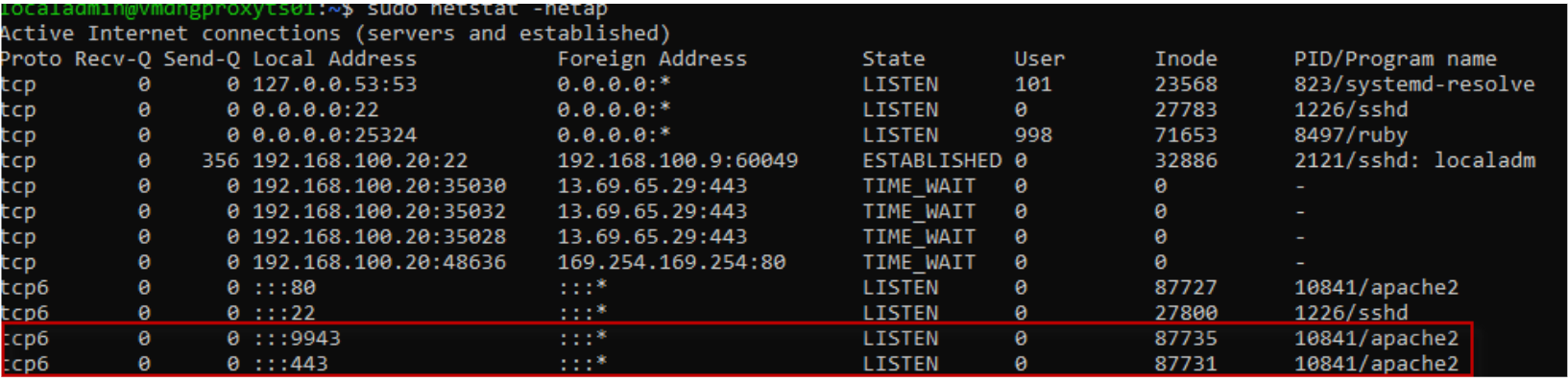
If you want to check your Reverse Proxy server is listening on ports for both virtual hosts, run the following command:
```
sudo netstat -netap
```
You should see both ports being listened by Apache.
## Conclusion
You can now access Pipeline Pilot and Spotfire *via* your Reverse Proxy server through `https://proxyserver.mycompany.com/spotfire` for Spotfire and `https://proxyserver.mycompany.com/` for Pipeline Pilot.