In this tutorial you will learn how to use the REST API Resource input type to have dynamic inputs in a main protocol's form of the SWAPP using REST endpoints. The endpoint will be implemented as a Pipeline Pilot protocol, which will be called utility protocol, but it could be any other endpoint, provided the CORS requirements are met. Note that the same utility protocol can be reused for several main protocols having the same input.
Create the main Pipeline Pilot protocol
The main protocol is the protocol which will be launched from the SWAPP and for which the form should contain a dynamic input.
For this tutorial the main protocol will be the example protocol "Load Drugs with REST input" located under Protocols/Discngine/Spotfire Enabled Protocols/Client Automation/SWAPP Examples/Load Drugs with REST input.
This protocol reads sample drugs data, filters by activity class and adds the data in a data table and a table plot in Spotfire. It takes two parameters: Activity Class of type String and Minimum Number of Compounds of type Long.
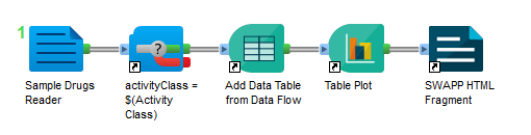
The options for Activity Class could be hard-coded as Legal Values in Pipeline Pilot. With this example protocol it could be done easily because the Sample Drugs Reader component always outputs the same data. But what if we were reading from a remote database whose content could change over time? In this case, the Legal Values would change and we would need to update the protocol each time.
Thus, the objective will be first to have a dynamic input provinding the list of activity classes for the Activity Class parameter. Then we will use the Minimum Number of Compounds parameter to filter the list further.
Select the activity class
Create the utility Pipeline Pilot protocol
The utility protocol is the protocol used to populate a parameter of the main protocol with dynamic inputs. It must expose through an HTTP call a JSON object containing an array of objects with at least a value key and optionally label and/or default keys, e.g. [{ label: 'My label', value: 'val1'}, {value: 'val2' }]. See in the list of inputs for more details about the endpoint format.
In this tutorial the utility protocol will generate the list of activity classes available, with class names as values and class names and molecule counts as labels.
Note that this protocol is already available as an example in the Connector Pipeline Pilot collection under Protocols/Discngine/Spotfire Enabled Protocols/Client Automation/SWAPP Examples/Utilities/Get Activity Classes - REST Resource.
-
Create the new protocol
- Open the Pipeline Pilot client.
- Create a new protocol.
- Save it somewhere in
Protocolsas "Get Activity Classes - REST Resource".
-
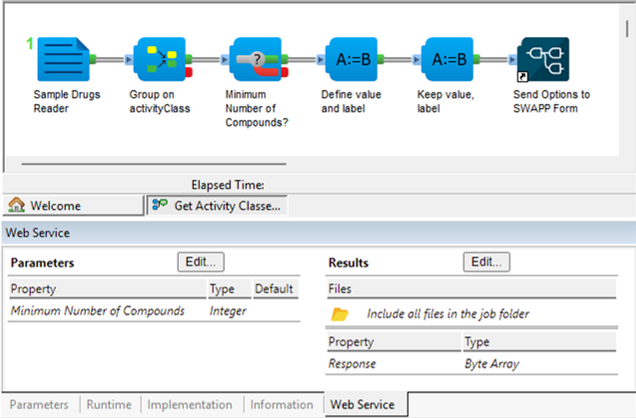
Load drugs data and group it by activity class
- Add the
Sample Drugs Readercomponent from the BIOVIA Chemistry collection to your protocol. - Add the
Group Data by Tagcomponent from the BIOVIA Generic collection to your protocol. - Set the
GroupUsingparameter to "activityClass".
- Add the
-
Define properties value as the activity class and label as activity class and molecule count (label will be the displayed value in the form)
- Add the
Custom Manipulatorcomponent from the BIOVIA Generic collection to your protocol. - Set the
Expressionparameter tovalue := activityClass; label := activityClass + ' (' + NumberInGroup + ')';
- Add the
-
Keep the properties value and label
- Add the
Keep or Reorder Propertiescomponent from the BIOVIA Generic collection to your protocol. - Set the
PropertyListparameter to "value | label".
- Add the
-
Format options to be sent to input of type "REST API Resource" as a JSON and expose it in a global property
- Add the
Send Options to SWAPP Formcomponent to your protocol. - Leave the
Result Property Nameparameter to the default value "Response".
- Add the
-
Declare the Web Service response of the protocol
- Go in the Web Service tab.
- In the Results section, click on "Edit".
- Add the property "Response" of type "Byte Array".
This last step is extremely important and is required to be able to use the protocol as a Web Service in the SWAPP. Without it, the output of the protocol would not be available through an HTTP call.

Register the main protocol in the SWAPP
-
Get the utility protocol link (endpoint URL)
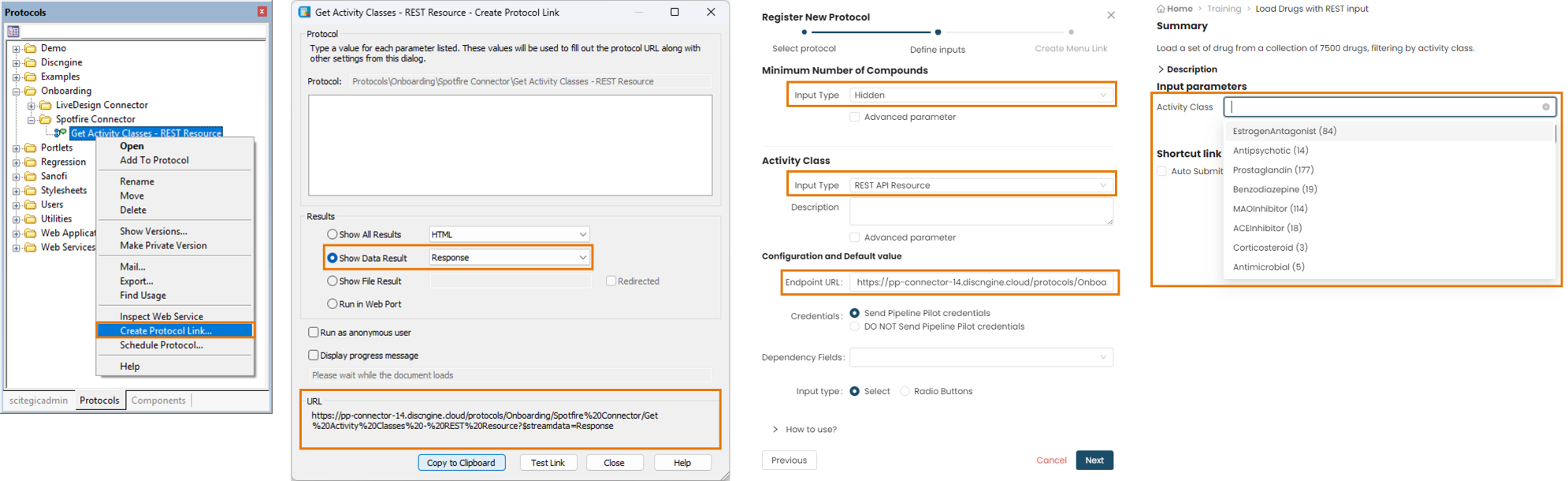
- In Pipeline Pilot, right click on the "Get Activity Classes - REST Resource" utility protocol in the explorer tab and click on "Create Protocol Link".
- In the popup window, check Show Data Result and select "Response". This will define the "Response" global property defined earlier as the output data.
- Copy the protocol link which should look like
https://pp.yourcompany.com/protocols/Discngine/Spotfire%20Enabled%20Protocols/Client%20Automation/SWAPP%20Examples/Utilities/Get%20Activity%20Classes%20-%20REST%20Resource?$streamdata=Response. It will be used later.
-
Register the main protocol in the SWAPP
- Open the registration form for the "Load Drugs with REST input" protocol. To have details on this step, see the the corresponding tutorial.
-
Hide unused parameter
- For now we won't use the
Minimum Number of Compoundsparameter so set it as Hidden.
- For now we won't use the
-
Set REST API Resource parameter type for main protocol
- Set the type of the
Activity Classparameter to "REST API Resource". - Set the utility protocol link previously copied in the Endpoint URL configuration option.
- Leave the configuration option Send Pipeline Pilot credentials selected. Since a Pipeline Pilot protocol is called, the credentials must also be sent. Alternatively, you can set the utility protocol to be called anonymously.
- Set the type of the
-
Complete the registration
- Fill the "Create Menu Link" section.
- Click on "Save Protocol".
-
Test form in SWAPP
- Select the "Load Drugs with REST input" protocol in the SWAPP menu.
- The Activity Class parameter should be populated with the list generated by the utility protocol.
Filter activity classes on minimum number of compounds
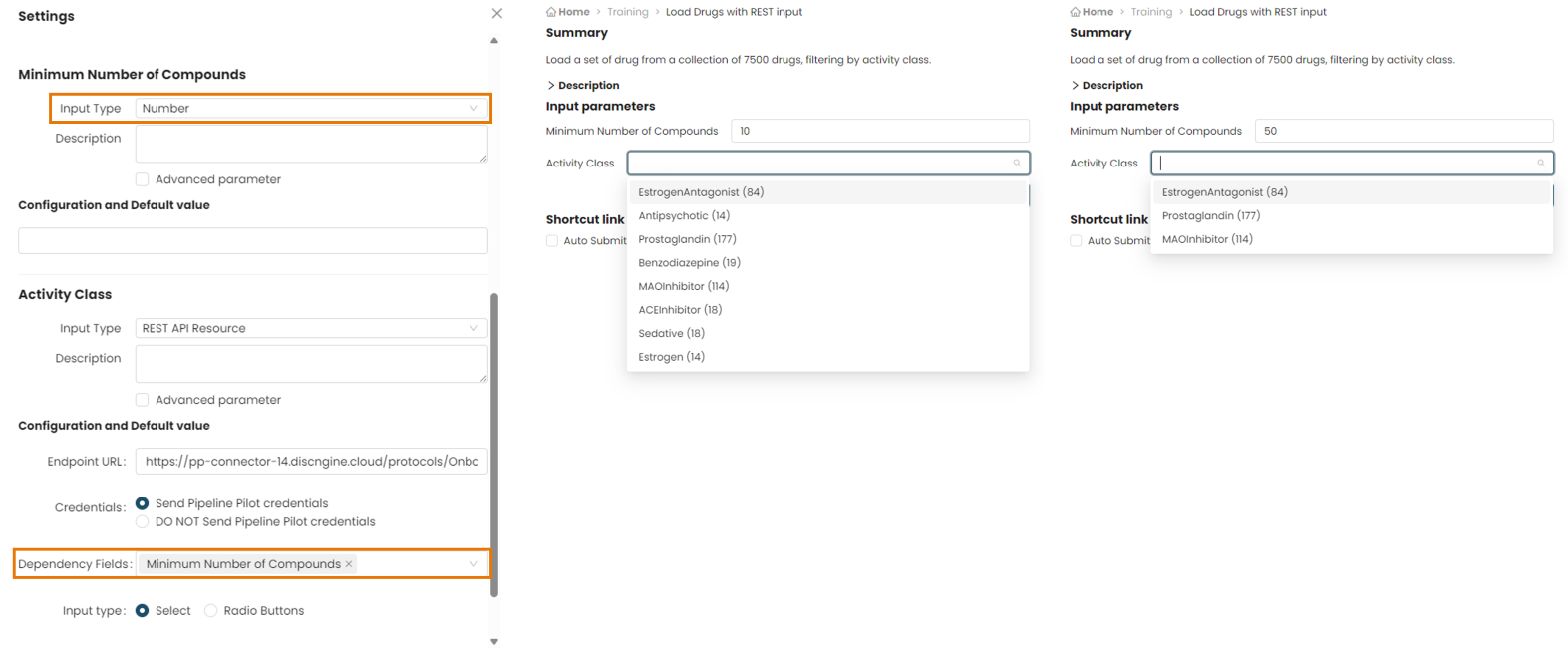
We now have a dynamically populated input but we can go even further. Imagine your utility protocol returns a list with thousands of options. It will be difficult for the end users to find what they need. What if they could use another input of the form to filter down the options in the list?
This is the purpose of the Dependency Fields option.
When defining an input of type REST API Resource in the SWAPP, any other input of the form can be used as a dependency field. It is even possible to pass multiple dependency fields. The values of all dependency fields will be passed to the Endpoint URL as query parameters. To use them in the utility protocol, make sure they are properly defined as protocol parameters and/or read them as global properties.
Add filter in the utility Pipeline Pilot protocol
In the "Load Drugs with REST input" protocol, we have a parameter called Minimum Number of Compounds. We need to add the same parameter in the "Get Activity Classes - REST Resource" protocol to filter the Activity Class parameter to only keep those with at least Minimum Number of Compounds compounds.
-
Edit the utility protocol in Pipeline Pilot
- Add a parameter
Minimum Number of Compoundsof type Long to the utility protocol.
- Add a parameter
-
Filter on number of compounds
- Add the
Custom Filter (PilotScript)component from the BIOVIA Generic collection to your protocol. - Set the
Expressionparameter to
if @'Minimum Number of Compounds' is defined and @'Minimum Number of Compounds' > 0 then NumberInGroup > @'Minimum Number of Compounds'; else True; end if; - Add the
Set dependency in the SWAPP
Let's edit the form definition to take that into account.
-
Edit the registered main protocol "Load Drugs with REST input" in the SWAPP
- Open Spotfire and the SWAPP.
- Click on the icon in the SWAPP menu to manage the registered protocols.
- Look for the previously registered "Load Drugs with REST input" protocol and click on the icon to edit it.
-
Enable the filter parameter
- Switch the type of the
Minimum Number of Compoundsparameter from Hidden to Number.
- Switch the type of the
-
Configure dependency for
Activity Classparameter- Set the configuration option Dependency Fields to
Minimum Number of Compounds. - Keep the "Endpoint URL" as it was set previously.
Note that if you create the protocol link again, you will need to remove the&Minimum+Number+of+Compounds=part. The link should look likehttps://pp.yourcompany.com/protocols/Discngine/Spotfire%20Enabled%20Protocols/Client%20Automation/SWAPP%20Examples/Utilities/Get%20Activity%20Classes%20-%20REST%20Resource?$streamdata=Response.
- Set the configuration option Dependency Fields to
-
Complete the registration
- Click on "Save Protocol".
- Click on "Save Menu".
-
Test form in SWAPP
- Select the "Load Drugs with REST input" protocol in the SWAPP menu.
- From now on, when you change
Minimum Number of Compounds, it will update the list ofActivity Class, filtering out only those with at least the required number of compounds.